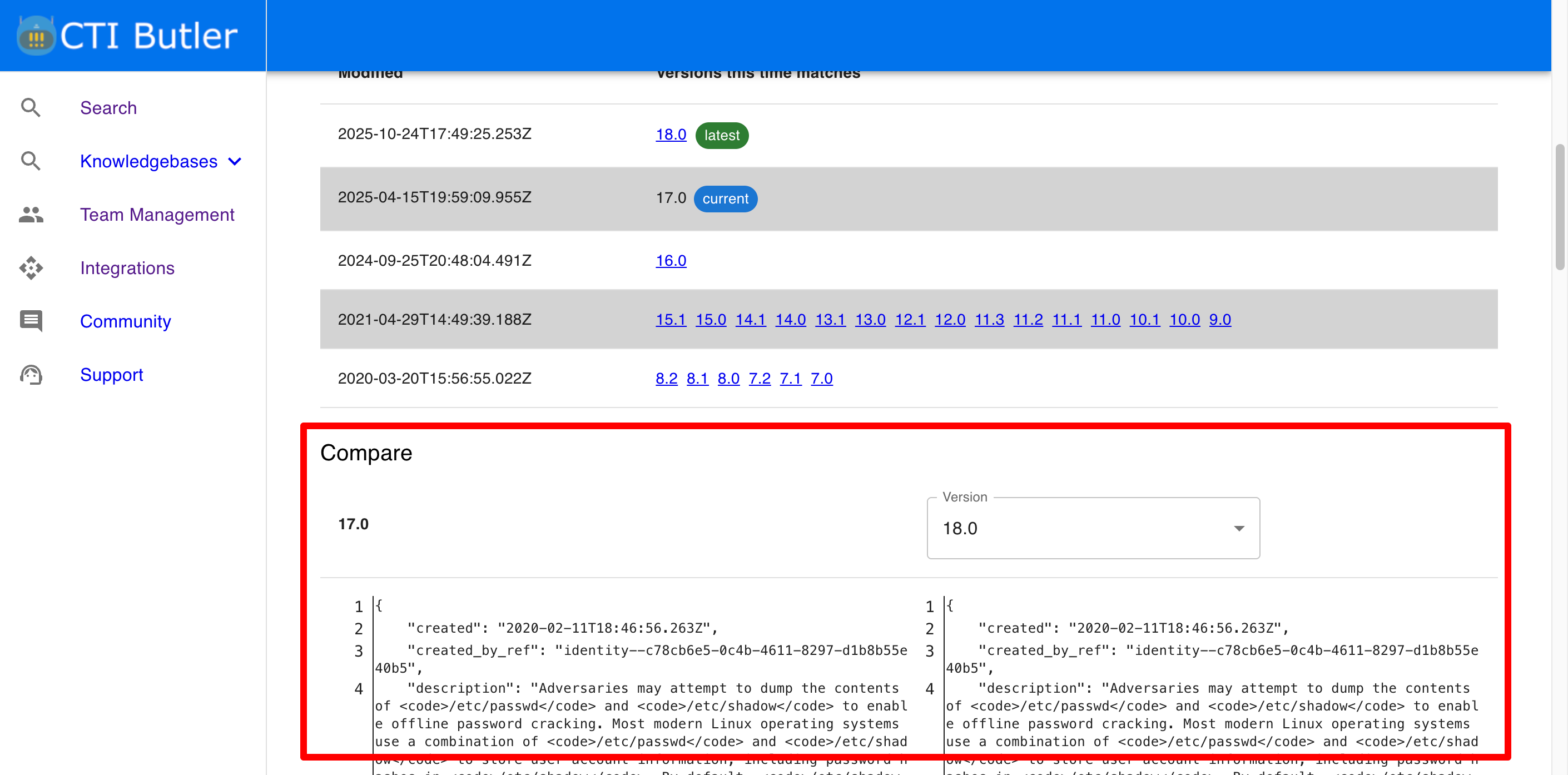
@dtp1900 I assume you’re talking about this section of the UI?
If so, there is not a single request to the API that will achieve this unfortunately.
That said, let me explain how we do it in the web app interface.
1. Request each version of the object
Firstly you need a copy of each object version. You can do this using the version filter. I will use T1003.008 seeing as you linked it above, and select ATT&CK version 17.0.
curl -X 'GET' \
  'https://api.ctibutler.com/v1/attack-enterprise/objects/T1003.008/?attack_version=17.0' \
  -H 'accept: application/json' \
  -H 'API-KEY: HIDDEN'
{
  "page_size": 50,
  "page_number": 1,
  "page_results_count": 1,
  "total_results_count": 1,
  "objects": [
    {
      "created": "2020-02-11T18:46:56.263Z",
      "created_by_ref": "identity--c78cb6e5-0c4b-4611-8297-d1b8b55e40b5",
      "description": "Adversaries may attempt to dump the contents of <code>/etc/passwd</code> and <code>/etc/shadow</code> to enable offline password cracking. Most modern Linux operating systems use a combination of <code>/etc/passwd</code> and <code>/etc/shadow</code> to store user account information, including password hashes in <code>/etc/shadow</code>. By default, <code>/etc/shadow</code> is only readable by the root user.(Citation: Linux Password and Shadow File Formats)\n\nLinux stores user information such as user ID, group ID, home directory path, and login shell in <code>/etc/passwd</code>. A \"user\" on the system may belong to a person or a service. All password hashes are stored in <code>/etc/shadow</code> - including entries for users with no passwords and users with locked or disabled accounts.(Citation: Linux Password and Shadow File Formats)\n\nAdversaries may attempt to read or dump the <code>/etc/passwd</code> and <code>/etc/shadow</code> files on Linux systems via command line utilities such as the <code>cat</code> command.(Citation: Arctic Wolf) Additionally, the Linux utility <code>unshadow</code> can be used to combine the two files in a format suited for password cracking utilities such as John the Ripper - for example, via the command <code>/usr/bin/unshadow /etc/passwd /etc/shadow > /tmp/crack.password.db</code>(Citation: nixCraft - John the Ripper). Since the user information stored in <code>/etc/passwd</code> are linked to the password hashes in <code>/etc/shadow</code>, an adversary would need to have access to both.",
      "external_references": [
        {
          "source_name": "mitre-attack",
          "url": "https://attack.mitre.org/techniques/T1003/008",
          "external_id": "T1003.008"
        },
        {
          "source_name": "Arctic Wolf",
          "description": "Julian Tuin, Stefan Hostetler, Jon Grimm, Aaron Diaz, and Trevor Daher. (2024, November 22). Arctic Wolf Observes Threat Campaign Targeting Palo Alto Networks Firewall Devices. Retrieved January 8, 2025.",
          "url": "https://arcticwolf.com/resources/blog/arctic-wolf-observes-threat-campaign-targeting-palo-alto-networks-firewall-devices/"
        },
        {
          "source_name": "Linux Password and Shadow File Formats",
          "description": "The Linux Documentation Project. (n.d.). Linux Password and Shadow File Formats. Retrieved February 19, 2020.",
          "url": "https://www.tldp.org/LDP/lame/LAME/linux-admin-made-easy/shadow-file-formats.html"
        },
        {
          "source_name": "nixCraft - John the Ripper",
          "description": "Vivek Gite. (2014, September 17). Linux Password Cracking: Explain unshadow and john Commands (John the Ripper Tool). Retrieved February 19, 2020.",
          "url": "https://www.cyberciti.biz/faq/unix-linux-password-cracking-john-the-ripper/"
        }
      ],
      "id": "attack-pattern--d0b4fcdb-d67d-4ed2-99ce-788b12f8c0f4",
      "kill_chain_phases": [
        {
          "kill_chain_name": "mitre-attack",
          "phase_name": "credential-access"
        }
      ],
      "modified": "2025-04-15T19:59:09.955Z",
      "name": "/etc/passwd and /etc/shadow",
      "object_marking_refs": [
        "marking-definition--fa42a846-8d90-4e51-bc29-71d5b4802168"
      ],
      "revoked": false,
      "spec_version": "2.1",
      "type": "attack-pattern",
      "x_mitre_attack_spec_version": "3.2.0",
      "x_mitre_data_sources": [
        "File: File Access",
        "Command: Command Execution"
      ],
      "x_mitre_deprecated": false,
      "x_mitre_detection": "The AuditD monitoring tool, which ships stock in many Linux distributions, can be used to watch for hostile processes attempting to access <code>/etc/passwd</code> and <code>/etc/shadow</code>, alerting on the pid, process name, and arguments of such programs.",
      "x_mitre_domains": [
        "enterprise-attack"
      ],
      "x_mitre_is_subtechnique": true,
      "x_mitre_modified_by_ref": "identity--c78cb6e5-0c4b-4611-8297-d1b8b55e40b5",
      "x_mitre_platforms": [
        "Linux"
      ],
      "x_mitre_version": "1.2"
    }
  ]
}
I would then make the same request for version 18.
2. Compare the objects using a JSON diff viewer
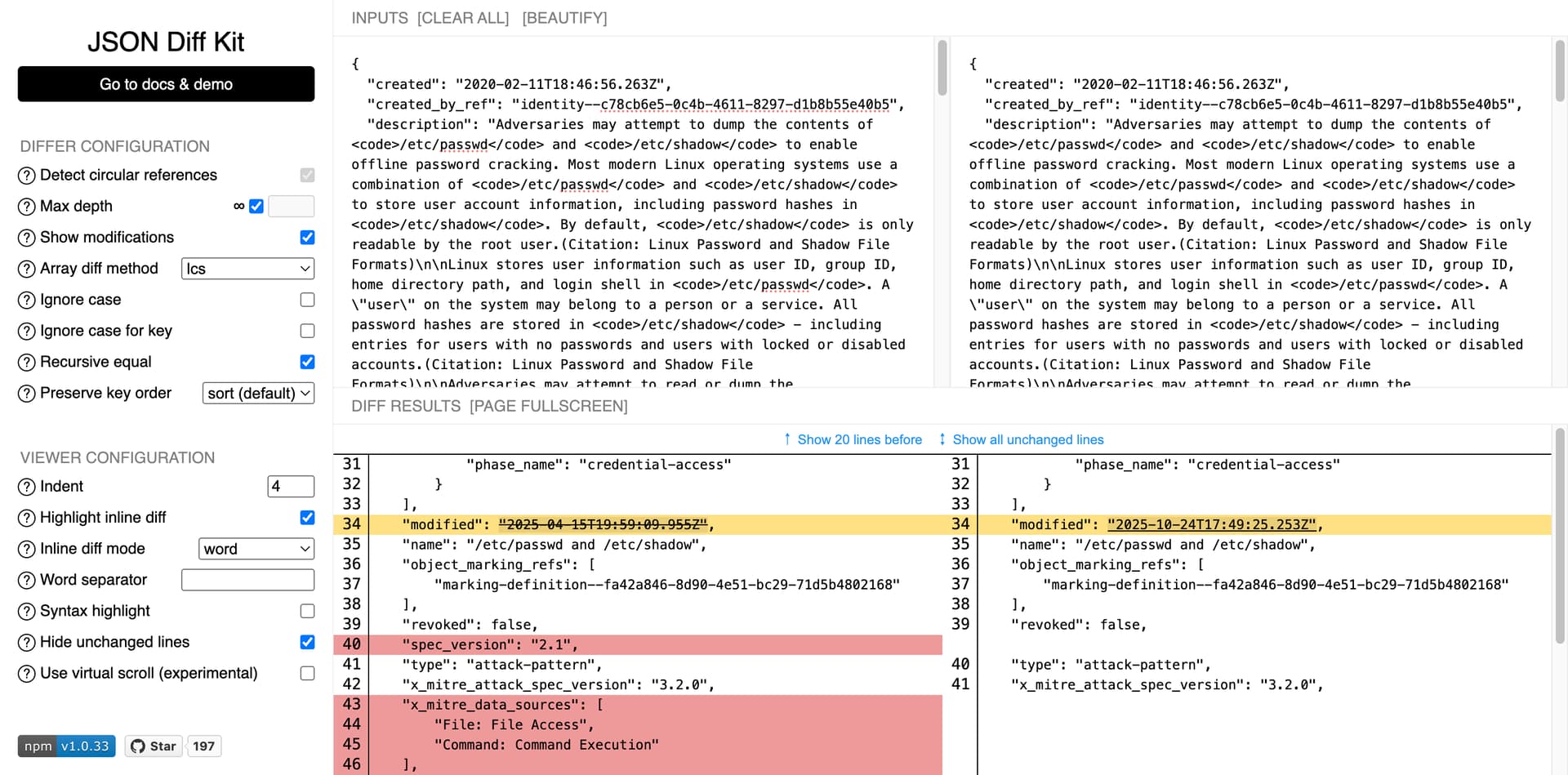
In the app we use JSON diff kit to compare the two object, but there are many others available.
If you paste both objects into the viewer, it’ll highlight the differences.
Would that suffice for your requirements?